When you reach the fees section, you’ll see several rows. Each one serves a specific purpose in the ecosystem of legal filing:
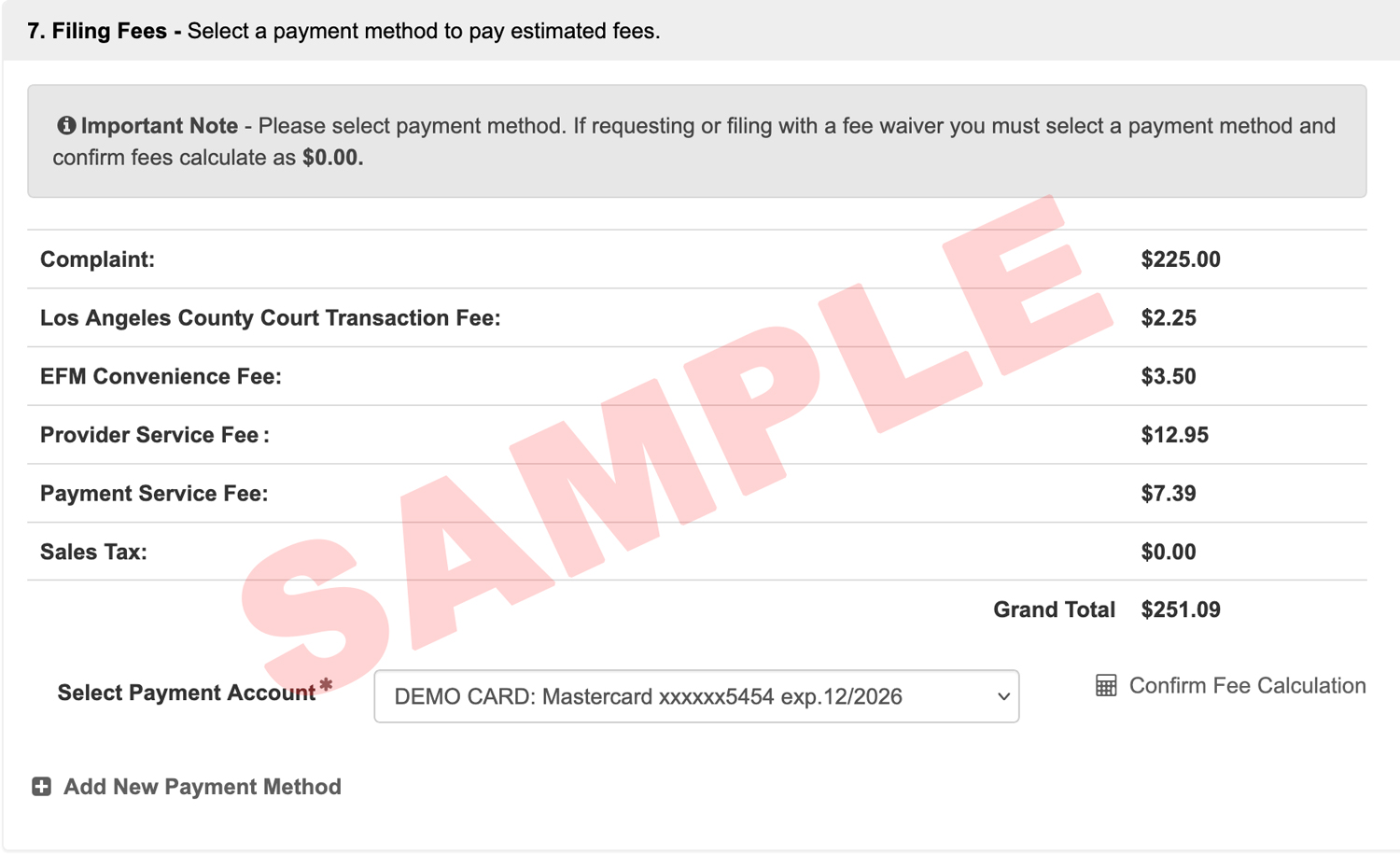
Court Document Fees: These are the fees set by the court for specific forms (e.g., a Complaint or a Motion). If this number looks wrong, double-check your Document Type selection or your choices in the Additional Info/Security and Additional Services section.
Mail Service Fees: Only appear if you’ve requested service of documents via Certified Mail or First-Class Mail.*
Court Transaction Fee: A flat fee some courts charge to process a filing.
EFM Convenience Fee: Some court’s E-Filing Managers (EFM) charge a convenience fee for each accepted filing. This fee covers the cost of the EFM software, which the court uses to receive, review, and process electronic filings submitted through any integrated e-filing service provider.
Provider Service Fee: This is the fee your chosen E-Filing Service Provider (EFSP) charges for each accepted filing. Please refer to your EFSP for more information regarding their fees.
Payment Service Fee: The Payment Processor for the court charges a fee of approximately 3% when a credit card is used, or a flat fee of up to $1 for an ACH payment.
Sales Tax: Sales tax may appear in the fees section because some state governments classify the e-filing service itself as a taxable transaction or service, requiring the payment processor to collect and remit the applicable state sales tax on the charge for filing.
Estimated Fees
Before you submit, you must select your payment type and click Confirm Fee Calculation. This pulls the most up-to-date fee data from the court based on your document types, any additional information from section 3 of the filing, and any party information pulled from the court’s case management system. The fees you see are only ESTIMATED fees and are not finalized until the filing clerk accepts the submission.
Pro Tip: If the fees look off, stop! Go back and review your Document Type and Case Information before hitting submit.
Multiple Pre-Authorization Holds on a Filing
One of the most common questions we receive is: “Why was I charged twice?” Every time you Submit a filing to the court, the court’s payment processor places a pre-authorization hold on your account for the estimated total. This isn’t a final charge yet; it’s the bank’s way of ensuring you have the funds available.
So, if you submit a filing and the court rejects it; then you immediately fix and resubmit it, you will see two pending charges. The first hold will eventually drop off within the time frame described in the next section. Only the successful filing will turn into a final, “posted” charge.
Learn more about pre-authorizations and debit cardsWhat happens if my filing is Rejected or Cancelled?
If your filing doesn’t go through for any reason (Rejection or Cancellation), the court does not collect the money. However, the bank has already “held” those funds.
Timeline to release the hold: Most banks take 3 to 14 business days to release this hold.
The 3 to 14 business day release period begins on the day your filing is rejected or cancelled, not the day you originally submitted it. Please account for the time the court takes to review your filing before the bank’s countdown starts.
Prepaid Cards: Be aware that your bank can take up to 30 days to release the funds on a pre-paid card.
Released Holds: When a hold is released, you will not see a refund transaction because the court only completes transactions upon the filing’s acceptance. Instead, the “Pending” line item will simply disappear from your bank statement as if it never happened.
Use of Debit Cards: Because it can take up to 14 business days for your bank to release the hold on your account, filers might not want to use a debit card for their filings. Learn more about pre-authorizations and debit cards.
* Mail Service currently only available for Green Filing and Court Filing attorneys and their staff.